Freedom vs Do Instead
A Freedom alternative for the moment you reach for your iPhone.
Freedom is built to coordinate distraction blocking across devices. Do Instead focuses on bringing a task into view when you reach for a distraction on iPhone. The first decision is how many devices your boundary needs to cover.
Apple Reminders and the Shortcuts pause are free. Scheduled blocking and Todoist require Pro.
Written by the maker of Do Instead · Reviewed
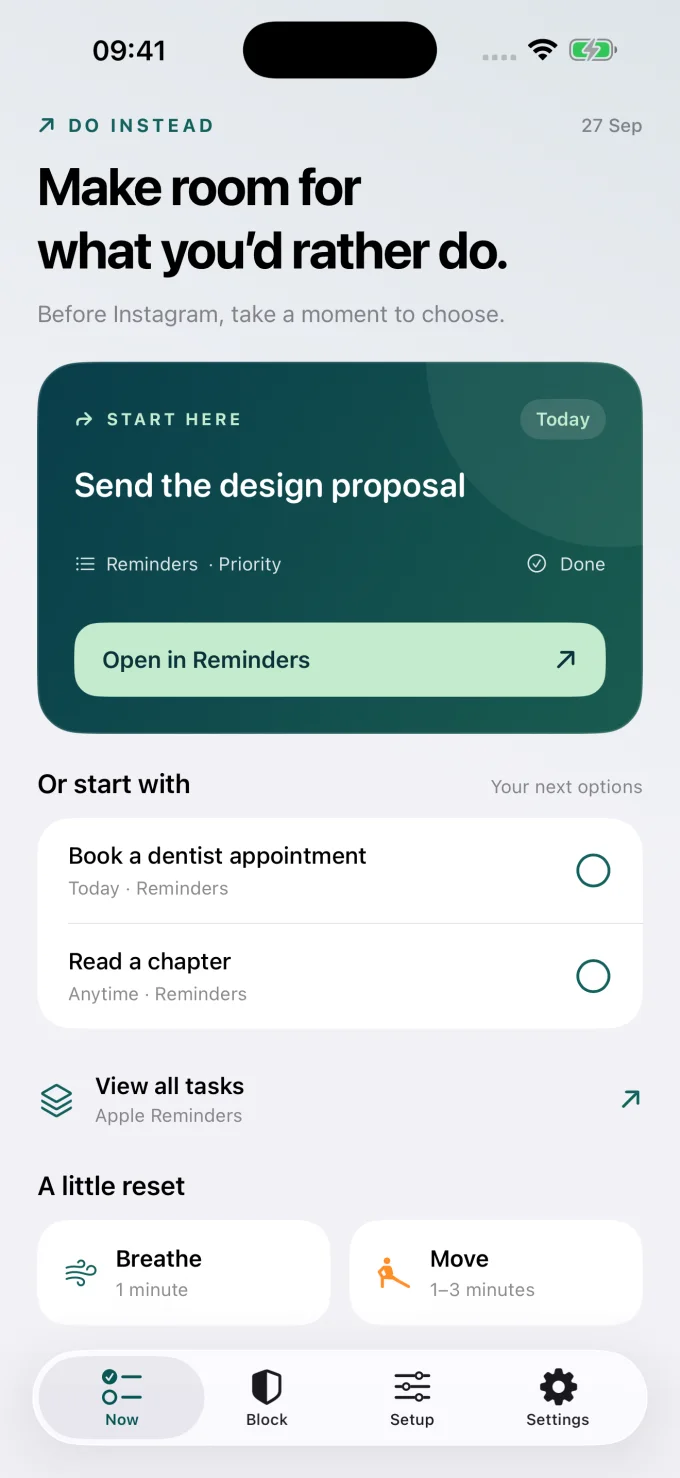
Example data; this is the app’s Now screen.
The useful difference
One boundary across devices, or an iPhone pause with a next step?
When Freedom fits
Keep what works for you.
Consider Freedom if distractions move between your phone and computer. It documents synced sessions, recurring schedules, and support across desktop and mobile platforms. [2]
When Do Instead fits
Put your own plans in view.
Consider Do Instead if your main problem is the automatic reach for your iPhone, and a task from Reminders or Todoist is a useful way back. The public download is the iPhone app.
| Your decision | Freedom | Do Instead |
|---|---|---|
| Device scope | Syncs blocking sessions across phones, tablets, and computers. [1] | Available for iPhone. Desktop extensions are awaiting store publication; no Android download. |
| Blocking structure | Immediate or scheduled sessions, recurring blocks, and Locked Mode. [1] | Separate Social and Work allowed windows with Pro. |
| In the blocked moment | The iOS listing describes a blocking screen that signals an active session. [1] | A task from your connected list on supported app-blocking screens, plus options inside Do Instead. |
| Free and paid | Limited free features and a paid Premium plan; check the current trial offer. [2] | Free Reminders, widgets, breathing, movement, and Shortcuts. Pro adds scheduling and Todoist. |
On a narrow screen, swipe the table to compare. Features can depend on the platform and plan. This page focuses on the iPhone decision.
Keep Freedom in the picture if the distraction follows you
If blocking a phone app sends you straight to the same website on a laptop, coordinating devices may be the most useful feature. Freedom’s official site lists Mac, Windows, iOS, Android, Chromebook, and Linux support. Its App Store description explains synced sessions across devices. [1] [2]
Try Do Instead for the phone-to-task transition
Do Instead is a more specific choice. The public app brings Apple Reminders or Todoist tasks into the moment you reach for a distraction on iPhone. You can open the app directly, use a widget, or set up the free Shortcuts pause. With Pro, scheduled blocking adds a boundary around that moment.
Be clear about what you would give up
Do Instead should not be chosen on the assumption that it replaces Freedom’s computer and Android coverage. Its desktop extensions are still awaiting store publication. If synchronized blocking across your current devices is essential, Freedom is the more direct fit today. If your priority is an existing iPhone task list, Do Instead is worth a separate trial of its free features.
Start with a task you already care about.
Apple Reminders and the Shortcuts pause are free. Scheduled blocking and Todoist require Pro.
A useful first try
Test the fit in your own day.
Keep your current computer setup and try Do Instead’s Reminders view or widget on iPhone. Then evaluate the Shortcuts pause during a normal day. Only compare blocking setups one at a time, so you can tell whether your phone’s access is controlled by Freedom or Do Instead.
Bring one task
Download Do Instead and connect Apple Reminders in Settings. Check that a useful task appears.
Reminders setup →Try the free pause
Follow the Setup tab to create a Shortcuts automation that opens Do Instead when a chosen app opens.
See a Shortcuts example →Add a boundary if it helps
For scheduled blocking or Todoist, review Pro in the app. Prices and eligible trials are shown before purchase.
Free & Pro details →
Do Instead does not selectively remove a social app’s feed while keeping its DMs available. App blocking affects the selected app. Website coverage depends on the browser and iOS version.
Before you choose
Questions worth asking.
Can Do Instead replace Freedom on Windows or Android?
Not with the public release described here. Do Instead is available for iPhone; desktop extensions are awaiting store publication, and there is no Android download. Freedom is the relevant option here for broader device coverage.
Can I start without changing my existing blocking sessions?
Yes. Connecting Reminders and trying a Do Instead widget does not require you to replace your current blocker. When comparing active blocking, use one setup at a time so the result is understandable.
Is Do Instead free forever or a free trial?
Do Instead has ongoing free features: Reminders, widgets, breathing, movement, and the Shortcuts route. Pro is a separate subscription. Any eligible Pro trial and its terms are shown in the app before purchase.
Does “try free” start a paid subscription?
The button opens the App Store download. Do Instead’s free features do not require a Pro subscription. If you choose a Pro offer in the app, review its price, trial eligibility, renewal, and cancellation terms before confirming with Apple.
Make room for what you’d rather do
Give your next task a chance.
Connect Apple Reminders. Try the free pause. Decide what fits your day.
iPhone · iOS 17 or later. Apple Reminders and the Shortcuts pause are free. Scheduled blocking and Todoist require Pro.
Sources and review notes
By Arkadiy Kondrashov, creator of Do Instead. This is our product comparison, based on public App Store listings and official documentation checked on 20 October 2026, not a hands-on test of every competitor feature. Do Instead details refer to public version 1.1.3. No ranking or results guarantee is implied.
- Freedom — US App Store listing
- Freedom — supported platforms, scheduling, and pricing FAQ
- Do Instead — public App Store features and free/Pro details
Prices, trials, and feature limits can change by region and version. Check each app’s current offer. Freedom and Do Instead are separate products; this page is not endorsed by Freedom.
Explore the other comparisons →