Jomo vs Do Instead
A Jomo alternative for tasks without earned unlocks.
Jomo offers a flexible set of blocking rules, unlock exercises, and routines. Do Instead takes a specific approach: bring your existing tasks into view while your allowed schedule controls access.
Apple Reminders and the Shortcuts pause are free. Scheduled blocking and Todoist require Pro.
Written by the maker of Do Instead · Reviewed
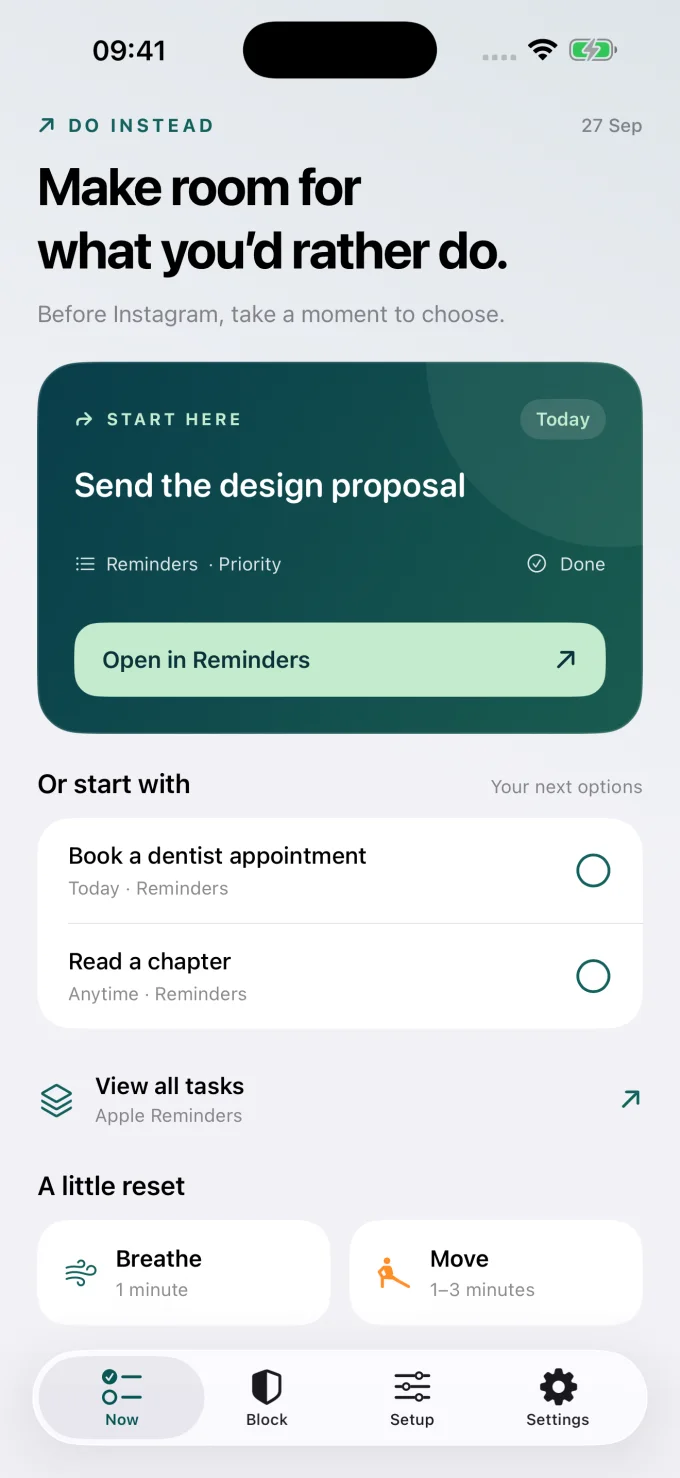
Example data; this is the app’s Now screen.
The useful difference
Make progress without turning it into screen time credit.
When Jomo fits
Keep what works for you.
Consider Jomo if you want habit completion to earn access, different unlock exercises, or flexible rule types. Its Routines and Locks are designed around those choices. [1]
When Do Instead fits
Put your own plans in view.
Consider Do Instead if you want a reminder of something you chose to do, with access controlled separately. Tasks come from Reminders or Todoist; finishing one does not open a blocked app.
| Your decision | Jomo | Do Instead |
|---|---|---|
| Habits and access | Routines can reward completed habits with access or earned time. [1] | Task completion and access are separate. Allowed times determine unlocking. |
| Ways to set boundaries | Schedules, usage limits, Locks, and habit-based Routines. [2] | Social and Work selections with their own allowed windows in Pro. |
| Unlock approach | Documented options include waiting, a reason, a password, QR codes, and AI proof. [2] | Pro adds a ten-minute delay before loosening protection while the shield is on. |
| Getting started | Free download with optional Jomo Plus purchases. [1] | Free Reminders and Shortcuts pause. Pro is needed for scheduled blocking and Todoist. |
On a narrow screen, swipe the table to compare. Features can depend on the platform and plan. This page focuses on the iPhone decision.
Jomo suits people who want a reward loop
Jomo’s published 2.0 release notes describe Routines that unlock apps or award time after habits are completed. That can be a useful structure if the reward helps you follow through. Its feature page also documents several unlock exercises, including AI proof. [1] [2]
Do Instead keeps the task and the boundary separate
You may prefer to finish a task without earning more scrolling. In Do Instead, the task is a suggestion drawn from your existing Reminders or Todoist list. Pro’s allowed windows decide when an app opens, regardless of whether you completed the suggestion. Neither approach is universally better; the choice is whether access should be a reward.
Use a familiar list for everyday commitments
A routine such as making the bed is different from a changing list of work and personal tasks. If your day includes reminders like sending a proposal, booking a visit, or returning a call, try bringing that existing list into the pause. Reminders is free in Do Instead; Todoist is part of Pro.
Start with a task you already care about.
Apple Reminders and the Shortcuts pause are free. Scheduled blocking and Todoist require Pro.
A useful first try
Test the fit in your own day.
Try Do Instead with one task you would value even if no screen time reward followed. Use the free Reminders connection and Shortcuts route first. If you later add a lunch access window with Pro, notice that the window opens on schedule rather than when a task is checked off.
Bring one task
Download Do Instead and connect Apple Reminders in Settings. Check that a useful task appears.
Reminders setup →Try the free pause
Follow the Setup tab to create a Shortcuts automation that opens Do Instead when a chosen app opens.
See a Shortcuts example →Add a boundary if it helps
For scheduled blocking or Todoist, review Pro in the app. Prices and eligible trials are shown before purchase.
Free & Pro details →
Do Instead does not selectively remove a social app’s feed while keeping its DMs available. App blocking affects the selected app. Website coverage depends on the browser and iOS version.
Before you choose
Questions worth asking.
Can Do Instead verify a photo to unlock an app?
The released Do Instead version compared here does not offer a photo-proof unlock. Jomo’s official feature page lists AI proof among its unlock options. Check Jomo’s current setup if proof-based access is what you need.
Does completing a task earn minutes in Do Instead?
No. Do Instead’s allowed times control access. Completing a task does not award minutes or unlock a protected app. Jomo’s documented Routines are the more relevant feature if you want to earn time.
Which should I choose for strict rules?
Review Jomo’s current Strict Mode if locking rules is central to your decision. Do Instead’s published Pro approach uses a ten-minute cooldown for turning protection off or widening access. Test the exact boundary you need on your own phone.
Does “try free” start a paid subscription?
The button opens the App Store download. Do Instead’s free features do not require a Pro subscription. If you choose a Pro offer in the app, review its price, trial eligibility, renewal, and cancellation terms before confirming with Apple.
Make room for what you’d rather do
Give your next task a chance.
Connect Apple Reminders. Try the free pause. Decide what fits your day.
iPhone · iOS 17 or later. Apple Reminders and the Shortcuts pause are free. Scheduled blocking and Todoist require Pro.
Sources and review notes
By Arkadiy Kondrashov, creator of Do Instead. This is our product comparison, based on public App Store listings and official documentation checked on 20 October 2026, not a hands-on test of every competitor feature. Do Instead details refer to public version 1.1.3. No ranking or results guarantee is implied.
- Jomo — US App Store listing and 2.0 release notes
- Jomo — rules, routines, unlocks, and Strict Mode
- Jomo Help — habits and rewarded access
- Do Instead — public App Store features and free/Pro details
Prices, trials, and feature limits can change by region and version. Check each app’s current offer. Jomo and Do Instead are separate products; this page is not endorsed by Jomo.
Explore the other comparisons →