one sec vs Do Instead
A one sec alternative that brings your task list closer.
one sec helps you interrupt automatic app openings. Do Instead gives that interruption a destination in Apple Reminders or Todoist. Both offer more than a simple timer; the useful difference is the workflow you want to keep.
Apple Reminders and the Shortcuts pause are free. Scheduled blocking and Todoist require Pro.
Written by the maker of Do Instead · Reviewed
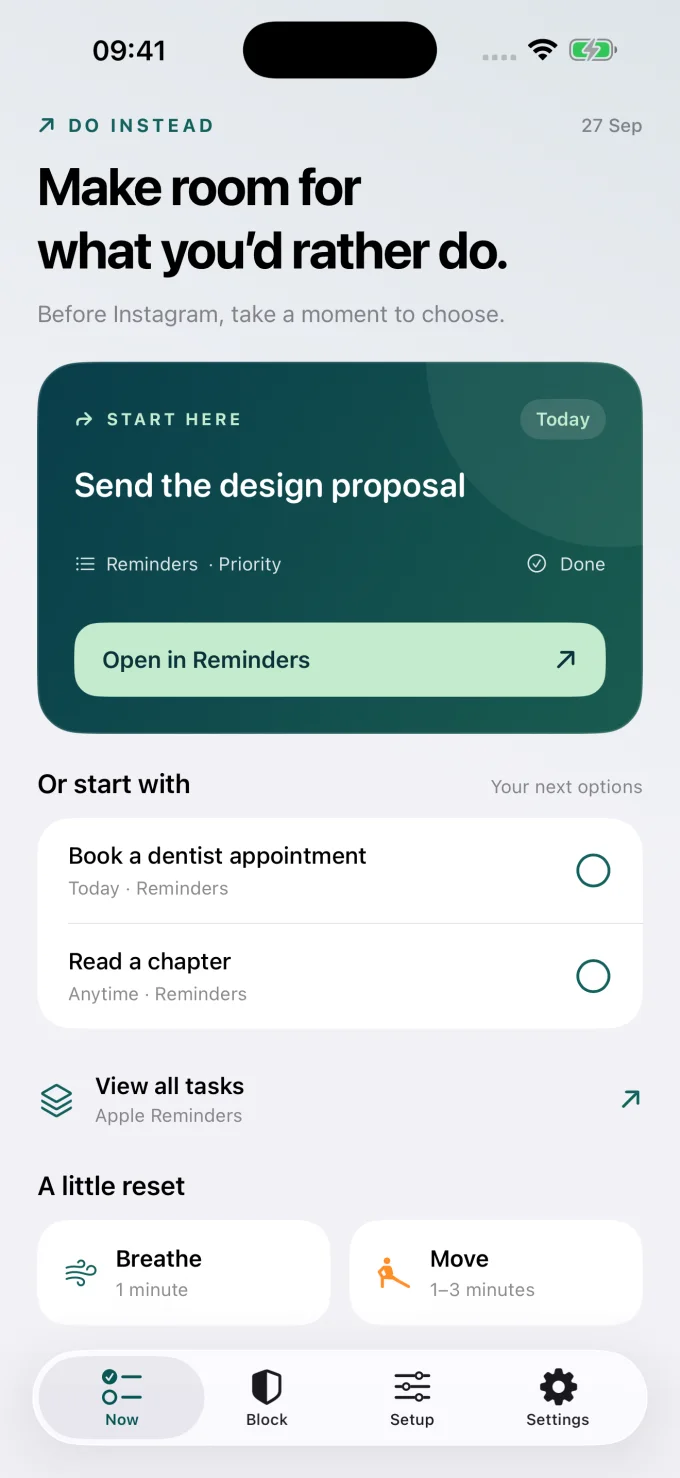
Example data; this is the app’s Now screen.
The useful difference
Which pause fits the way you plan?
When one sec fits
Keep what works for you.
Consider one sec if you want a range of interventions, scheduled blocks, or a connection to Structured. Its Structured integration can show upcoming tasks and block during unfinished ones. [3]
When Do Instead fits
Put your own plans in view.
Consider Do Instead if your commitments already live in Reminders or Todoist. You can see a next task, take a breathing break, or move, while Pro schedules decide access separately.
| Your decision | one sec | Do Instead |
|---|---|---|
| The pause | Breathing and other interventions before using distracting apps. [1] | Your existing tasks in view, with breathing and desk movement as other options. |
| Task connection | Structured integration can show upcoming tasks and block during unfinished tasks. [3] | Apple Reminders is free; Todoist requires Pro. Completing a task does not unlock blocked apps. |
| Blocking | Scheduled blocking is part of its documented feature set. [2] | Pro blocks selected apps outside Social and Work allowed times. |
| Free starting point | The free version targets one app; Pro extends coverage and features. [4] | Reminders, widgets, breathing, movement, and the Shortcuts route are free. |
On a narrow screen, swipe the table to compare. Features can depend on the platform and plan. This page focuses on the iPhone decision.
one sec already goes beyond breathing
A fair comparison should recognize that one sec also offers scheduled blocks and alternative activities. Its Structured integration links the pause to planning: it can display upcoming tasks and block distractions during unfinished tasks. If Structured is central to your day, that connection is a strong reason to consider one sec. [2] [3]
Keep Reminders or Todoist as your source of truth
Do Instead is designed for a different starting point: a task list you already keep in Apple Reminders or Todoist. You do not have to rebuild those tasks in a new planner. Open the Now tab to see suggestions, or keep a task near you with a widget. Todoist’s connection uses an API token and requires Pro.
Separate a task from permission to scroll
In Do Instead, finishing a task is not a way to earn an unlock. With Pro, the allowed schedule decides when your chosen apps are available. You can choose the task because it matters, take a break, or simply put your phone down. That separation is useful if you do not want task completion to become a screen time reward system.
Start with a task you already care about.
Apple Reminders and the Shortcuts pause are free. Scheduled blocking and Todoist require Pro.
A useful first try
Test the fit in your own day.
Choose a real task that can move forward in a few minutes. Connect Reminders and create the Shortcuts automation described in Do Instead’s Setup tab. On your next automatic app open, compare how it feels to see that commitment. If you already use Structured, compare its one sec connection before changing planners.
Bring one task
Download Do Instead and connect Apple Reminders in Settings. Check that a useful task appears.
Reminders setup →Try the free pause
Follow the Setup tab to create a Shortcuts automation that opens Do Instead when a chosen app opens.
See a Shortcuts example →Add a boundary if it helps
For scheduled blocking or Todoist, review Pro in the app. Prices and eligible trials are shown before purchase.
Free & Pro details →
Do Instead does not selectively remove a social app’s feed while keeping its DMs available. App blocking affects the selected app. Website coverage depends on the browser and iOS version.
Before you choose
Questions worth asking.
Does one sec only add a breathing delay?
No. Its official site documents other interventions, scheduled blocking, alternative activities, and integrations. The distinction here is the task source and how access relates to the task.
Is Do Instead’s Shortcuts route a strict block?
No. It opens Do Instead when a chosen app opens. It creates a gentler pause. Scheduled blocking through Apple’s Screen Time features requires Do Instead Pro.
Should I move from Structured to Apple Reminders?
Not just to use a blocker. If Structured works for you, try its one sec integration. Do Instead is particularly relevant if you already prefer Reminders or Todoist and want to keep that list.
Does “try free” start a paid subscription?
The button opens the App Store download. Do Instead’s free features do not require a Pro subscription. If you choose a Pro offer in the app, review its price, trial eligibility, renewal, and cancellation terms before confirming with Apple.
Make room for what you’d rather do
Give your next task a chance.
Connect Apple Reminders. Try the free pause. Decide what fits your day.
iPhone · iOS 17 or later. Apple Reminders and the Shortcuts pause are free. Scheduled blocking and Todoist require Pro.
Sources and review notes
By Arkadiy Kondrashov, creator of Do Instead. This is our product comparison, based on public App Store listings and official documentation checked on 20 October 2026, not a hands-on test of every competitor feature. Do Instead details refer to public version 1.1.3. No ranking or results guarantee is implied.
- one sec — US App Store listing
- one sec — official feature overview
- one sec — Structured integration
- one sec Help — free and Pro comparison
- Do Instead — public App Store features and free/Pro details
Prices, trials, and feature limits can change by region and version. Check each app’s current offer. one sec and Do Instead are separate products; this page is not endorsed by one sec.
Explore the other comparisons →