Opal vs Do Instead
An Opal alternative with your next task in view.
Opal gives you rules and feedback for managing screen time. Do Instead connects the moment of distraction to a task you already keep in Apple Reminders or Todoist. Choose the approach that helps you follow through.
Apple Reminders and the Shortcuts pause are free. Scheduled blocking and Todoist require Pro.
Written by the maker of Do Instead · Reviewed
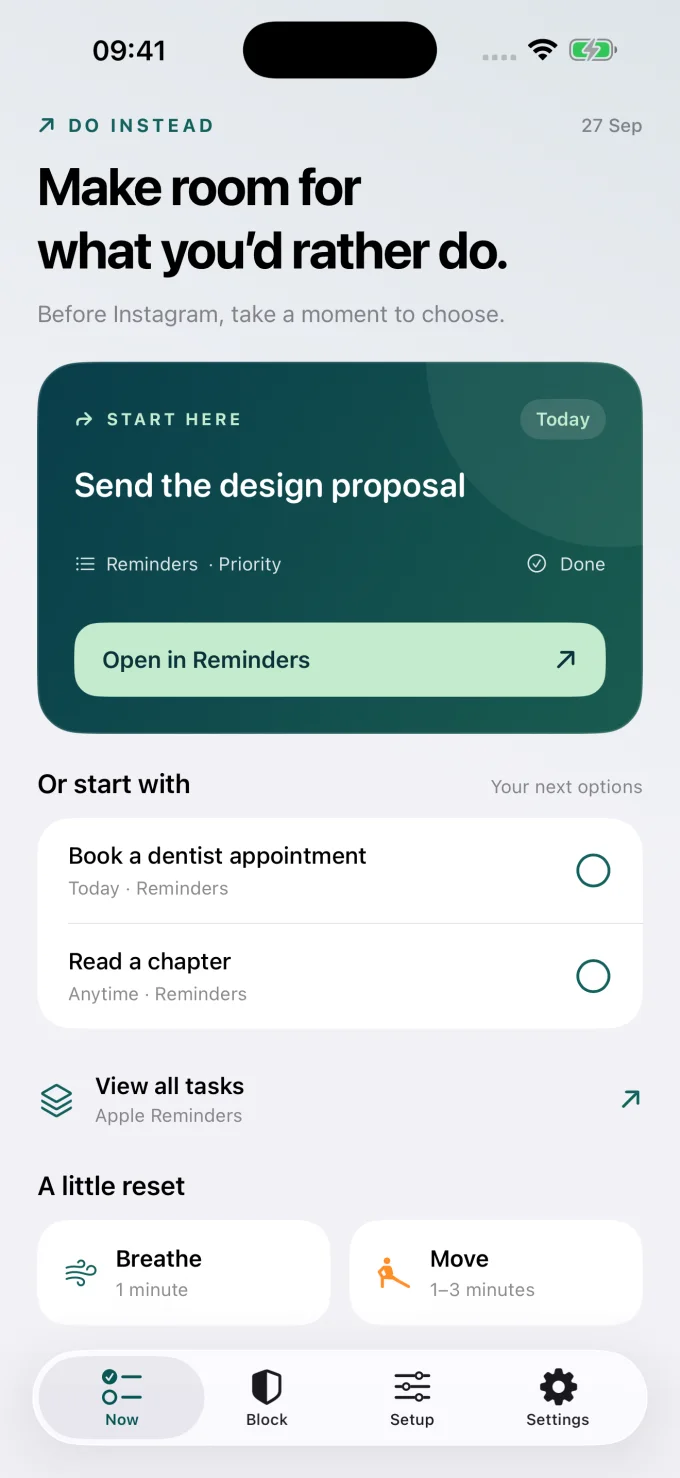
Example data; this is the app’s Now screen.
The useful difference
Screen time rules and reports, or a task to return to?
When Opal fits
Keep what works for you.
Consider Opal if you want daily time or opening limits, focus reports, and stricter rule settings. Its published feature set puts measuring and controlling app use at the center. [2]
When Do Instead fits
Put your own plans in view.
Consider Do Instead if you already plan in Reminders or Todoist and want that plan to appear when you reach for a distraction. With Pro, give Social and Work separate allowed times.
| Your decision | Opal | Do Instead |
|---|---|---|
| Ways to set boundaries | Schedules, Time Limits, Open Limits, and immediate timers. [2] | Social and Work allowed windows with Pro. The free Shortcuts route creates a pause. |
| What meets the impulse | Blocking screens and rules that determine access. [1] | A next task from your connected list on supported app-blocking screens; breathing and movement in the app. |
| Progress and commitment | Focus reports, a daily score, and Pro Hard Mode options. [2] | A ten-minute delay before turning protection off or widening access while the shield is on. |
| Getting started | Free version plus optional Pro. Check the current offer in Opal. [3] | Free Reminders, widgets, breathing, movement, and Shortcuts. Pro adds scheduled blocking and Todoist. |
On a narrow screen, swipe the table to compare. Features can depend on the platform and plan. This page focuses on the iPhone decision.
Start with the question you want the app to answer
If your question is “How much did I use this app today?”, Opal’s limits and reporting are directly relevant. Its current help center describes schedules, time limits, opening limits, and a focus score. Those are useful reasons to keep Opal if they already work for you. [2]
Bring an existing commitment into the pause
Do Instead is worth trying when you know what you want to do, but lose sight of it at the moment you reach for your phone. A reminder such as “Send the design proposal” gives that moment a concrete next step. You can start with your existing Reminders list, without moving your planning into a new system.
Choose the kind of commitment you want
Opal documents Hard Mode options that restrict unblocking and resetting rules. [4] Do Instead’s released Pro workflow uses allowed times and a ten-minute cooldown before loosening protection. These are different commitments. If you specifically want a rule that cannot be casually ended during its active period, review Opal’s current restrictions and emergency options.
Start with a task you already care about.
Apple Reminders and the Shortcuts pause are free. Scheduled blocking and Todoist require Pro.
A useful first try
Test the fit in your own day.
Try one moment that matters: opening a social app while you meant to finish a small task. Add a clear reminder, then use Do Instead’s free Shortcuts route to bring it into view. If a task helps more than another usage number, explore scheduled blocking with Pro.
Bring one task
Download Do Instead and connect Apple Reminders in Settings. Check that a useful task appears.
Reminders setup →Try the free pause
Follow the Setup tab to create a Shortcuts automation that opens Do Instead when a chosen app opens.
See a Shortcuts example →Add a boundary if it helps
For scheduled blocking or Todoist, review Pro in the app. Prices and eligible trials are shown before purchase.
Free & Pro details →
Do Instead does not selectively remove a social app’s feed while keeping its DMs available. App blocking affects the selected app. Website coverage depends on the browser and iOS version.
Before you choose
Questions worth asking.
Is Do Instead a free replacement for all of Opal?
No. Do Instead has useful free features, but scheduled blocking and Todoist require Pro. It is also not a replacement for every Opal limit, report, or Hard Mode setting.
Can I keep using Opal while I try Do Instead?
You can try Do Instead’s Reminders and widgets without changing your existing blocks. For a useful comparison of blocking behavior, evaluate one blocking setup at a time so you know which app controls access.
Does Do Instead have Opal’s daily app allowance?
The released Do Instead workflow described here uses allowed time windows, rather than a daily usage allowance. If a fixed number of minutes per day is your main requirement, Opal’s Time Limits or Apple’s built-in App Limits are relevant options.
Does “try free” start a paid subscription?
The button opens the App Store download. Do Instead’s free features do not require a Pro subscription. If you choose a Pro offer in the app, review its price, trial eligibility, renewal, and cancellation terms before confirming with Apple.
Make room for what you’d rather do
Give your next task a chance.
Connect Apple Reminders. Try the free pause. Decide what fits your day.
iPhone · iOS 17 or later. Apple Reminders and the Shortcuts pause are free. Scheduled blocking and Todoist require Pro.
Sources and review notes
By Arkadiy Kondrashov, creator of Do Instead. This is our product comparison, based on public App Store listings and official documentation checked on 20 October 2026, not a hands-on test of every competitor feature. Do Instead details refer to public version 1.1.3. No ranking or results guarantee is implied.
- Opal — US App Store listing
- Opal Help — free and Pro features
- Opal — current plans
- Opal Help — rule restrictions and emergency access
- Do Instead — public App Store features and free/Pro details
Prices, trials, and feature limits can change by region and version. Check each app’s current offer. Opal and Do Instead are separate products; this page is not endorsed by Opal.
Explore the other comparisons →