ScreenZen vs Do Instead
A ScreenZen alternative built around your real tasks.
ScreenZen offers a broad set of free controls for app use. Do Instead is worth considering when you want your existing Reminders or Todoist tasks to become the next step after a pause.
Apple Reminders and the Shortcuts pause are free. Scheduled blocking and Todoist require Pro.
Written by the maker of Do Instead · Reviewed
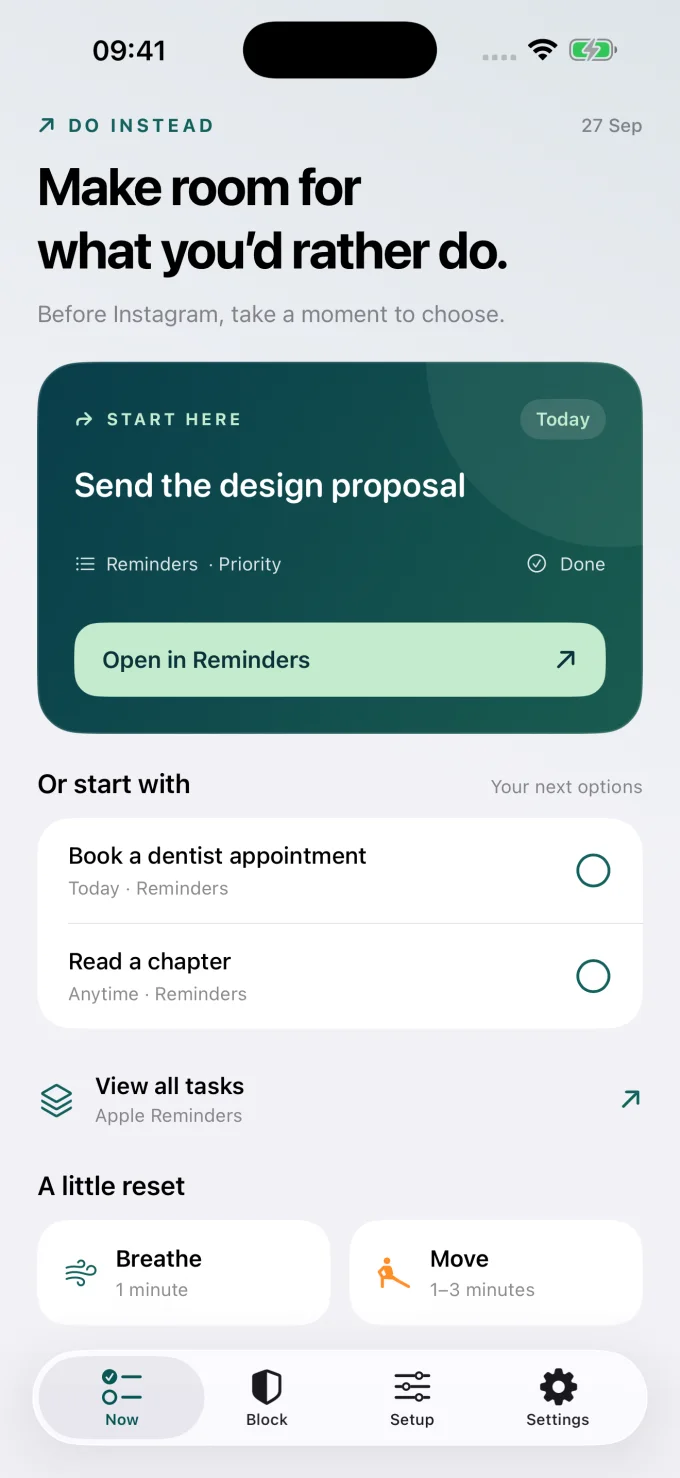
Example data; this is the app’s Now screen.
The useful difference
Choose your next step, as well as your limit.
When ScreenZen fits
Keep what works for you.
Consider ScreenZen if free blocking, configurable waits, opening limits, and short access periods meet your needs. Its own website says the app is free, with optional donations. [2]
When Do Instead fits
Put your own plans in view.
Consider Do Instead if the list you already maintain is the most useful thing to see when you reach for a distraction. Start with Reminders for free; add Pro for schedules or Todoist.
| Your decision | ScreenZen | Do Instead |
|---|---|---|
| Price model | Free to use; optional donations support the project. [2] | Free features plus optional Pro. Scheduled blocking is paid. |
| Ways to interrupt scrolling | Opening delays, short access periods, and optional blocks after limits. [1] | A free Shortcuts automation opens Do Instead; Pro adds scheduled blocking. |
| Your next action | Prompts, breathing, and other activities during the wait. [1] | Tasks from Apple Reminders or Todoist, plus breathing and desk movement. |
| Schedule or quota | Controls for time ranges, number of opens, or screen time. [1] | Separate Social and Work allowed windows. Task completion does not change access. |
On a narrow screen, swipe the table to compare. Features can depend on the platform and plan. This page focuses on the iPhone decision.
Free blocking is a real reason to choose ScreenZen
There is no need to switch just because another app exists. ScreenZen’s official site says it is free and supports optional donations. If its boundaries suit you and price is the deciding factor, it deserves a place on your shortlist. [2]
A limit and an alternative solve different parts of the habit
ScreenZen describes waits before opening apps, limited access periods, and blocks based on time or opening counts. [1] Do Instead’s emphasis is what you could do with the moment you get back. Your reminder is already yours: call someone, finish a small piece of work, or prepare for tomorrow.
Use the task list you already trust
Connect Apple Reminders in Do Instead Settings and check the Now tab. Today’s tasks are considered before overdue work, with priority helping choose. Todoist is available with Pro. This comparison does not assume ScreenZen lacks useful alternative activities; it focuses on Do Instead’s specific Reminders and Todoist connection.
Start with a task you already care about.
Apple Reminders and the Shortcuts pause are free. Scheduled blocking and Todoist require Pro.
A useful first try
Test the fit in your own day.
Before changing any blocks, try a Reminders widget on your Home Screen. Put one clear, manageable task in your list. Then try the free Shortcuts pause for an app you open automatically. Decide whether seeing your own task adds something useful to your current routine.
Bring one task
Download Do Instead and connect Apple Reminders in Settings. Check that a useful task appears.
Reminders setup →Try the free pause
Follow the Setup tab to create a Shortcuts automation that opens Do Instead when a chosen app opens.
See a Shortcuts example →Add a boundary if it helps
For scheduled blocking or Todoist, review Pro in the app. Prices and eligible trials are shown before purchase.
Free & Pro details →
Do Instead does not selectively remove a social app’s feed while keeping its DMs available. App blocking affects the selected app. Website coverage depends on the browser and iOS version.
Before you choose
Questions worth asking.
Is Do Instead cheaper than ScreenZen?
No cheaper-than claim is made here. ScreenZen says its app is free. Do Instead’s free tier includes Reminders and the Shortcuts route, while scheduled blocking and Todoist require Pro.
Which app should I use for a number of opens per day?
ScreenZen explicitly lists blocking after a chosen number of opens. Do Instead’s released scheduled-blocking workflow is based on allowed time windows, so ScreenZen is the more direct match for that particular requirement.
Can I see my tasks without subscribing?
Yes. Apple Reminders and Home and Lock Screen widgets are free in Do Instead. The free Shortcuts route can also bring you into the app when a chosen distraction opens. It does not provide Pro’s scheduled blocking.
Does “try free” start a paid subscription?
The button opens the App Store download. Do Instead’s free features do not require a Pro subscription. If you choose a Pro offer in the app, review its price, trial eligibility, renewal, and cancellation terms before confirming with Apple.
Make room for what you’d rather do
Give your next task a chance.
Connect Apple Reminders. Try the free pause. Decide what fits your day.
iPhone · iOS 17 or later. Apple Reminders and the Shortcuts pause are free. Scheduled blocking and Todoist require Pro.
Sources and review notes
By Arkadiy Kondrashov, creator of Do Instead. This is our product comparison, based on public App Store listings and official documentation checked on 20 October 2026, not a hands-on test of every competitor feature. Do Instead details refer to public version 1.1.3. No ranking or results guarantee is implied.
- ScreenZen — US App Store features
- ScreenZen — official pricing and feature FAQ
- Do Instead — public App Store features and free/Pro details
Prices, trials, and feature limits can change by region and version. Check each app’s current offer. ScreenZen and Do Instead are separate products; this page is not endorsed by ScreenZen.
Explore the other comparisons →