TL;DR: pick a need, then a small action
If you have two minutes, look away from the feed, get comfortable, or send one deliberate message. With five minutes, make a drink, read a few pages, or step outside. With fifteen minutes, take a short walk, call someone, or finish one clearly defined task.
Choose the easiest useful option, not the most impressive one. Rest counts. You can keep scrolling intentionally too; the aim is to make a choice instead of defaulting to the feed.
What were you hoping the feed would give you?
Before choosing an activity, finish this sentence: “Right now I want…” A break from effort needs a different replacement from something to do while waiting for a train.
- Rest: choose something with no score, output or obligation.
- Connection: contact one person rather than opening an endless stream.
- A change of scene: move, look outside, or change where you are sitting.
- Progress: do one small thing you already wanted to do.
Match the location as well. A quiet waiting room calls for a different option from your kitchen. If standing or walking is not comfortable or possible, choose a seated change of position, music, reading, or simply a pause. There is no required activity here.
Give your replacement a natural finish: one song, one page, one message, one cup of tea. “Become a reader” is a project. “Read the page I left open” is something you can start now.
When you are tired, bored or waiting
If you are too tired to be productive
Remove the productivity requirement. Put the phone face down, sit comfortably, listen to a familiar song, or do nothing for a couple of minutes. You do not have to turn every recovered moment into work. If a task list feels like another demand, skip it.
If you are bored between things
Keep a tiny waiting menu: one saved article, one book, one person to reply to. Decide before opening the phone. For example, “I will read this saved page until my bus arrives” has an endpoint that “I will check social media” may not.
If you are avoiding something difficult
Make the first action smaller than the whole task. Open the document and write its heading. Find the bill, without promising to do all your finances. Draft the first sentence of the message. You can stop after that step; the purpose is to make starting concrete.
If scrolling is how you stay in touch
Keep the part you value. A planned conversation, a particular group, or a short check-in may belong in your day. Blocking an entire social app can also block its messages, so decide whether a schedule fits better than removing access altogether.
Your three-choice checklist
Choose a rest option, a connection option and a small task. Write them in a note or on paper where you usually scroll. Then use this checklist to make them easy to reach. The checkboxes are for this page only; they do not save a plan or send data.
Try this once in a situation you recognize: after lunch, waiting for the kettle, or sitting down after work. Tomorrow, ask whether the replacement was available and appealing. If it was too much effort, simplify it. You do not need to add a stricter rule before changing an impractical alternative.
Let your existing task list supply one option
If progress is what you want in that moment, Do Instead for iPhone can bring a task you already keep into view. Apple Reminders is available in the free version; Todoist requires Pro. This is useful when the problem is forgetting your own plan as soon as you open a distraction.
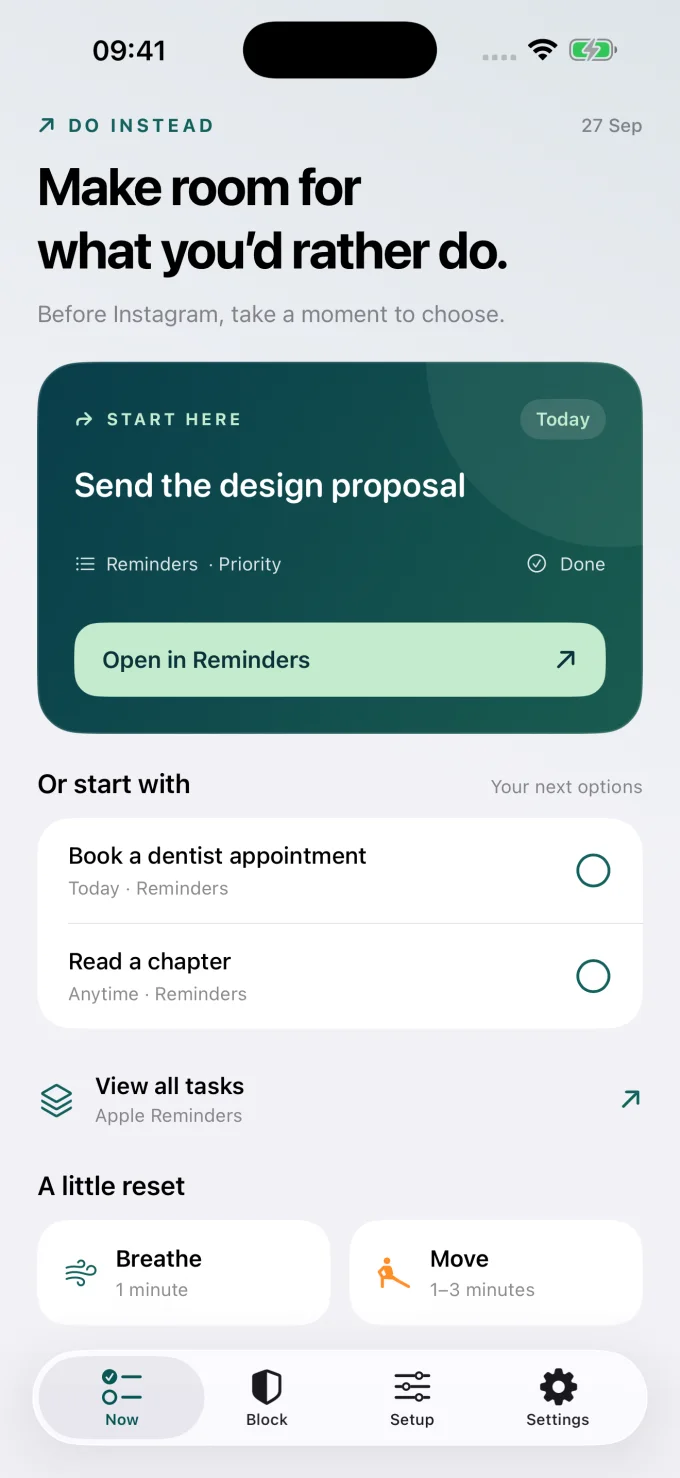
The free Shortcuts workflow opens Do Instead as a pause when you launch a chosen app. It is not a strict block. Pro adds scheduled app blocking with allowed times. Completing a task does not unlock an app or earn minutes; the schedule determines access.
If you want an opening intervention and use Structured, read one sec vs Do Instead. If you want habits to earn access, Jomo’s Routines are a different approach. You may also find that a paper list and a phone placed out of reach are enough.
Questions about replacing scrolling
What can I do instead of scrolling before bed?
Choose a quiet option with a clear finish: a few pages, one familiar song, or preparing something for the morning. Keep it easy to stop. If your phone is the cue, place the alternative beside where you normally use it.
Does the replacement have to be productive?
No. Enjoyment, rest and connection are valid reasons to put a feed down. Pick something you want in your day, rather than turning every break into a task.
Can I still use social media?
Yes. You can give it an intentional place, such as a short check-in after lunch. If you want a technical boundary, use an allowance or a schedule that matches that choice.
Will these ideas cure doomscrolling?
This is a practical menu, not a treatment or a promise of a particular outcome. Try an option in one recurring situation and judge whether it helps you make the choice you intended.
Start with one alternative you actually want
Choose one situation, one small replacement and a clear endpoint. Make the alternative easy to begin before your next automatic opening. If tasks are useful to you, bring your existing list into the pause. If you need rest, give yourself permission to rest.
Bring your own plans into view
Make room for what you would rather do.
Start with Apple Reminders and a pause before a distraction.
iPhone · iOS 17+. Reminders and the Shortcuts pause are free. Scheduled blocking and Todoist require Pro. This link opens the App Store; any Pro offer and trial terms are shown before purchase.